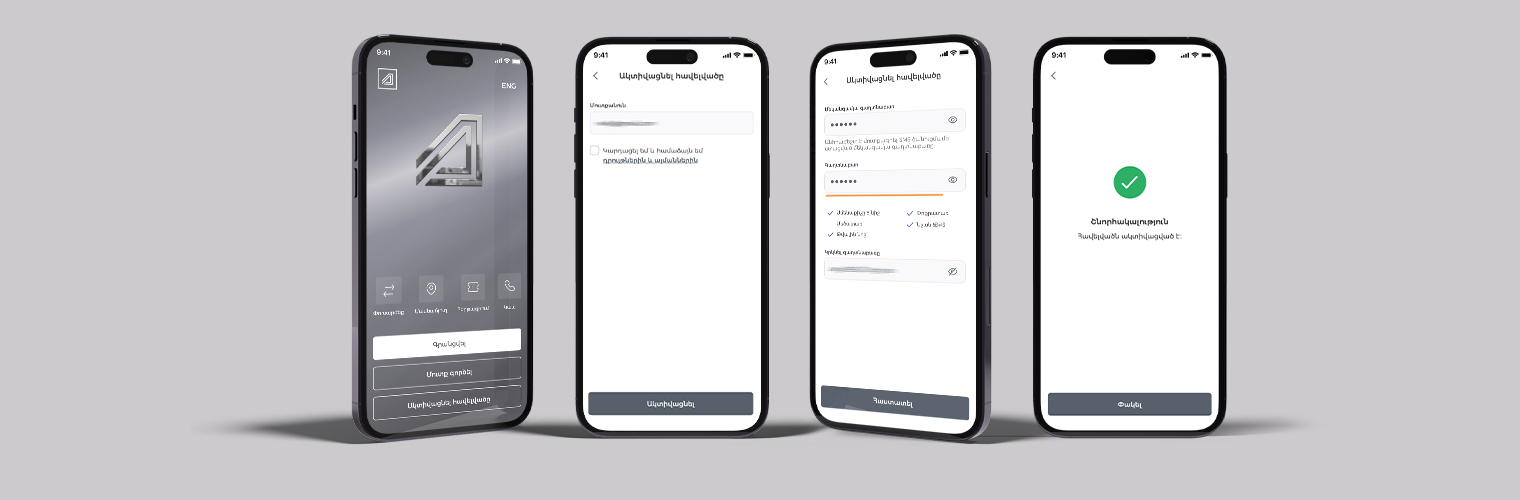
Follow the steps below to activate the app.
STEP 1
Open the Ardshininvest mobile app and press the Activate button.
STEP 2
STEP 3
Confirm that you have read and agree to the terms and conditions, then
press the Activate button. After
this step, you will receive a one-time password on the phone number registered
with the bank.
STEP 4
Enter the one-time password you received in the OTP field.
STEP 5
Create a new password by following the required format and enter it in the Password field.
STEP 6
Re-enter the newly created password in the Repeat Password field and press the Confirm button.
If the app activation is successful, you will see a confirmation page after pressing the Confirm button. Then, by pressing the Close button, you will be able to continue using the app.